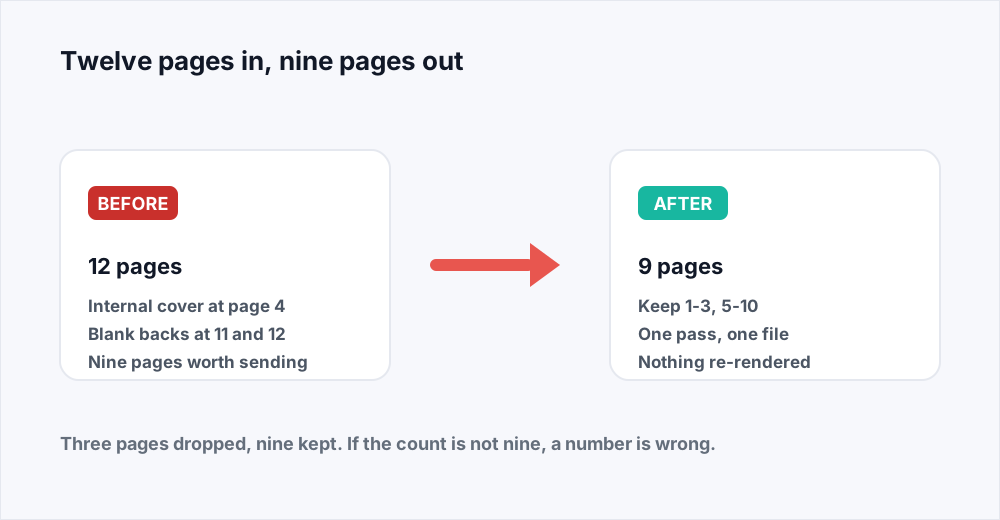
A twelve-page file has to go out this afternoon. Pages eleven and twelve are the blank backs the duplex scanner produced, and page four is an internal cover sheet with a reviewer's initials on it. Nine pages should leave the building and three should not.
To delete pages from a PDF, open Organize PDF, add the file, and type the pages you want to keep - for that example, 1-3, 5-10. Download the result and it is a nine-page document. Anything you did not name is not in it. That is the whole operation, and it takes half a minute once you know which numbers to type.
What happens inside the file explains both what you get and what you do not. Deleting is a copy: a new document is built out of the pages you kept, in the order you named them, and each one is carried across exactly as it was. Nothing is re-rendered, so text stays selectable and images keep their resolution. The pages you dropped are simply not copied.
Below: how to describe the pages, how to do it in one pass, how to check the result by counting, what deleting does not fix, and when Split PDF is the tool you actually wanted.
How to delete pages from a PDF in four steps
The short version, for someone with a file open and a deadline.
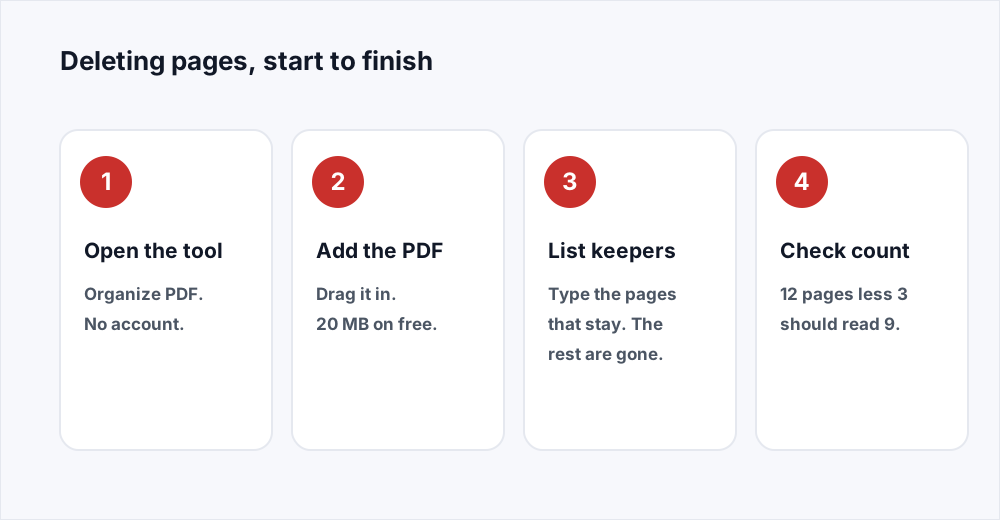
क़दम 1: Open Organize PDF
Go to Organize PDF. Nothing to install and no account to make.
क़दम 2: Add the document
Drag the PDF onto the page or choose it. Up to 20 MB a file on the free plan, or 250 MB on Pro.
क़दम 3: List the pages that stay
Type the pages you are keeping, in the order you want them. 1-3, 5-10 drops page four and everything after ten. Every page you leave out is deleted.
क़दम 4: Check the count, then download
Work out how many pages the result should have and compare it with what the tool shows. If they agree, download. One file comes back and the input is deleted from the server.
Name the pages you keep, not the pages you drop
The first surprise is that there is no delete box. The organizer asks for the pages you want, and deleting is what happens to everything else. People expect to type 4, 11, 12 and watch those pages vanish; what they type is 1-3, 5-10, the same instruction from the other end.
It reads backwards for about a minute and then stops being strange, because keeping is the only operation that can also express order and rotation. A list of pages to remove can say what goes; it cannot say that the summary should move to the front, or that the appendix needs a quarter turn. A list of pages to keep says all three at once.
The notation is the one everybody already uses in a print dialogue. A number is a page, two numbers with a hyphen are a run of pages inclusive at both ends, and commas separate them. The gaps between your ranges are the deletions, and they are the only record of them: nothing will say "page 4 removed", because as far as the new document is concerned page four never existed.
Before you commit, read the list back as a sentence. 1-3, 5-10 reads as: the first three pages, then five to ten. If the sentence you just said includes a page you meant to delete, you have written the remove list rather than the keep list.
What to type to remove pages from a PDF
Common deletions, written as the pages that stay.
| Pages to delete | What you type | Pages you end up with |
|---|---|---|
| Page 4 of 12 | 1-3, 5-12 | 11 |
| Pages 11 and 12 of 12 | 1-10 | 10 |
| Page 4 and pages 11-12 of 12 | 1-3, 5-10 | 9 |
| Pages 4-9 of 60 | 1-3, 10-60 | 54 |
| Every even page of 24 | 1, 3, 5, 7, 9, 11, 13, 15, 17, 19, 21, 23 | 12 |
Delete multiple pages from a PDF in one pass
There is a temptation to work one deletion at a time: remove the cover sheet, download, upload the result, remove the blanks, download again. It works, and it is worse, because each pass renumbers everything after the pages it removed. The numbers you noted for the second deletion are no longer right, and the count you finally check is the count of the last pass rather than of the whole job.
One list handles any number of deletions, wherever they sit. Pages scattered through a long file are still just ranges: 1-40, 42-118, 120-199 removes pages 41, 119 and 200 from a two-hundred-page file, in six numbers of typing.
The one reason to use two passes is rotation that applies to some pages and not others, since a rotation reaches everything you keep in that pass. Drop what you do not want first, then rotate, and check the count after each.
Check the result by page count before you send it
A deletion has no visible failure mode. Type 1-3, 5-10 when you meant 1-3, 5-11 and nothing goes wrong: you get a perfectly good document that is one page short, and nobody notices until the person at the other end asks about it.
So do the arithmetic first. Add up the pages in your ranges - 1-3 is three, 5-10 is six, nine in total - and compare that with the count the tool reports. Two numbers agreeing is a weak check, but it catches the three mistakes that actually happen: an off-by-one at the end of a range, a printed page number used instead of a file position, and a missing range.
When they disagree, the size of the gap says where to look. Out by one is a range boundary. Out by two or three usually means printed numbering on a document with front matter.
Four deletions people actually make
The same operation, applied to documents that come through every day.
- The blank backs of a duplex scan. Ten double-sided sheets of single-sided paper give twenty pages, every even one empty. Type 1, 3, 5 and so on through 19.
- The internal cover sheet. A routing slip with initials sits at page four of a twelve-page pack. Type 1-3, 5-12 and the pack goes out clean.
- A section that is not for this audience. Pages 4 to 9 of a sixty-page report are the pricing model. Type 1-3, 10-60.
- The duplicate page in the middle. A merge went wrong and page nine appears twice. Type 1-9, 11-24.
What deleting pages does not do
It does not shrink a scanned file by much. A page's weight is its own content, so removing three of twelve pages removes roughly a quarter of the bytes and no more. If the file was 40 MB because every page is a 600-dot-per-inch photograph, the nine you kept are still nine photographs. Deleting is not a compression strategy; Compress PDF is, and running it afterwards means only the pages you are sending get re-encoded.
It does not remove anything from a page you kept. That is the assumption behind most of the trouble people get into: the result holds the full text, images and metadata of every page in your list, and a search for a name still finds it if the name is on a page that survived.
It cannot work on a file with an open password, because an encrypted document's pages cannot be read in order to copy them. And it does not change your original: what you download is a new document, which is useful when a deletion turns out to have been wrong.
When the job is really an extraction or a reorder
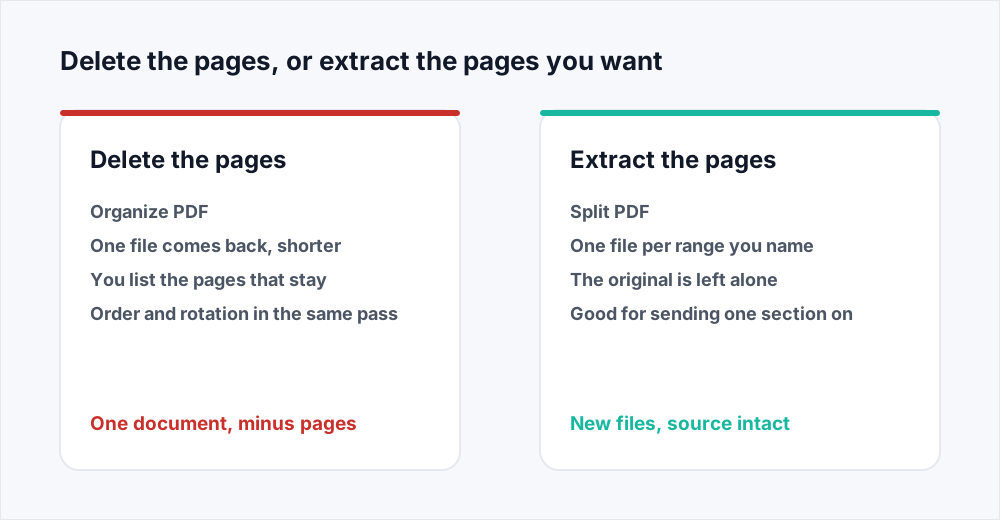
Deleting and extracting sound like opposites and are close cousins, which is why people reach for the wrong one. The test is what you want to be holding at the end. If it is one document that is the original minus some pages, that is a deletion and Organize PDF does it. If the answer is a separate file containing a particular part, that is an extraction, and Split PDF does it - the split guide covers the range notation there.
A worked example of each. "Send the board pack without the pricing appendix" is a deletion: one file, six pages lighter, still a board pack. "Send finance their six pages" is an extraction: a new six-page file, the board pack left as it was.
Reordering is the third of the set and lives in the same box. Because the list you type is the order of the result, moving a section is free: 29-30, 1-28 puts the last two pages of a thirty-page file at the front, and if page four should also go it is 29-30, 1-3, 5-28. The guide to organizing pages goes further into that, and Merge PDF joins a trimmed file to something else.
How to remove pages from a PDF without Acrobat
Deleting a page is the commonest reason somebody goes looking for a PDF editor, and it is one of the few jobs that genuinely does not need one. Nothing on the page is being changed: the operation is structural, and a browser tab can ask for it as well as a desktop application can. No watermark, no trial, no account.
The limits are worth knowing before you upload rather than after. Deleting pages does not make a scan searchable - optical character recognition is only in PDF to Word and PDF to Excel, on Pro - and we do not remove passwords or redact.
What happens to your file
Organizing runs on a server. The upload is streamed to disk rather than held whole in memory, the new document is assembled from the pages you named, and the file you sent is deleted the moment that finishes. The result waits thirty minutes at most. The security page sets out each stage and how long it lasts.
The pages you deleted are not held anywhere either. They were never written into the output, and the file they came from is gone with the rest of it.
Frequently asked questions
How do I delete a page from a PDF free?
Open Organize PDF, add the file, and type every page except the one you want gone. For a ten-page file losing page four, type 1-3, 5-10. Free, no account, no watermark.
How do I delete multiple pages from a PDF at once?
Write the pages that stay as a list of ranges, and every page you leave out is deleted in the same pass. Dropping pages 4, 11 and 12 from a twelve-page file is 1-3, 5-10. There is no limit on how many deletions one list expresses.
How do I remove pages from a PDF without Acrobat?
Use Organize PDF in a browser. Removing a page is a structural change, not an edit to anything drawn on the page, so no desktop editor is needed: the pages you keep are copied into a new document and the rest are not.
Does removing pages from a PDF make the file smaller?
Only in proportion to the pages removed. Each page carries its own weight, so dropping a quarter of them saves about a quarter of the size, and a heavy scan stays heavy. If the result still has to fit an email limit, run Compress PDF on it afterwards.
Does deleting a page remove its text from the rest of the document?
No. Deleting affects only the pages you dropped. Every page you kept is copied across complete, with its text still selectable and searchable. If a sentence on a page you are keeping must not go out, the whole page has to go.
Can I remove a page from a PDF online if the file has a password?
Not while it is encrypted, because the pages cannot be read in order to copy them. Remove the open password first, then delete the pages. We do not offer password removal ourselves.
In short
To delete pages from a PDF, list the pages that stay rather than the ones that go: the gaps in your list are the deletions. Do the whole job in one pass, use the page positions your reader shows rather than the numbers printed on the paper, and check your arithmetic against the count the tool reports before you download.
Remember what it does not do. The file only gets smaller in proportion to the pages removed, and nothing is taken off a page you kept. If you want a separate file of those pages rather than a shorter original, that is Split PDF.
Every tool here is free and none of them needs an account - see every tool.