You are about to send a bank statement, a payslip or a tenancy agreement, and one line of it should not travel with the rest. So you open the file, draw a black rectangle over the account number, save, and attach it. It looks right. On screen the number is gone.
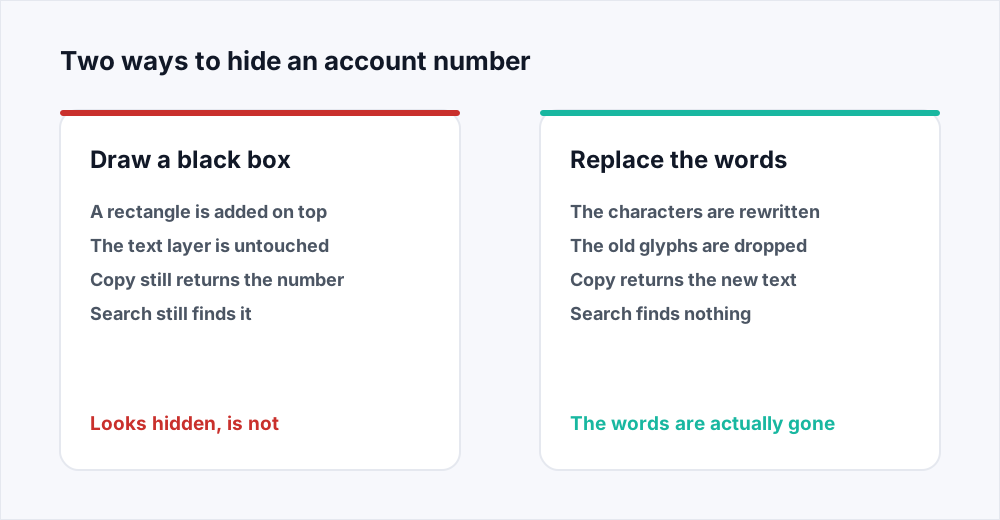
It is not gone. To redact a PDF properly you have to remove the characters themselves, and a black rectangle removes nothing. A PDF is a stack of drawing instructions, and the rectangle you added is one more instruction, drawn last and therefore on top. The instruction that draws the account number is still in the file, underneath, exactly as it was. Anyone who selects the page and copies it gets the number back. Anyone who searches for it finds it. Anything that reads a PDF rather than looks at one - a search index, a script, a converter - never sees the rectangle at all.
The fix is to change the words rather than to cover them. Our Edit PDF tool rewrites existing text in the page's own font, in your browser, so the characters you replace are the characters that leave. If a whole page is the problem, Organize PDF drops it entirely. One thing we do not offer, and are honest about further down: a dedicated redaction tool that also scrubs metadata, attachments and comments. Court and medical documents need that, and need a specialist tool for it.
Why a PDF keeps the text you covered up
A page in a PDF is not a picture of a document, and not a document in the way a Word file is. It is a short program: move here, select this font at this size, draw these characters, fill this rectangle with this colour. A reader runs the program top to bottom and paints the result, so whatever is drawn last sits on top of whatever came before.
A black box is therefore a fill instruction appended to the end of that program. It changes what the page looks like and nothing else. The draw-these-characters instruction for the account number is still sitting where it always was, a few lines earlier, complete with the position that says exactly where those digits belong.
That is why copying works. When you select text, the reader is not reading pixels; it is reading the character-drawing instructions and handing you what they say. It has no opinion about what is painted over them. The same is true of the search box, of a crawler indexing the file, and of the twenty-line script anybody can write.
The failure is invisible to the person who made it. You look at your own file, you see a black bar, and the bar is genuinely there. Nothing warns you. The document gives up the secret only to someone who asks it a different question.
How to remove text from a PDF permanently
Replacing the words changes the file rather than the picture of it.
Langkah 1: Open the file in the editor
Go to Edit PDF and choose the document. It opens in your browser and is never uploaded, which matters when the thing you are removing is the thing you do not want on a server.
Langkah 2: Click into the text you want gone
Select the existing text and edit it in place. The editor keeps the page's own font, so the replacement sits on the line as though it had always been there.
Langkah 3: Type what should be there instead
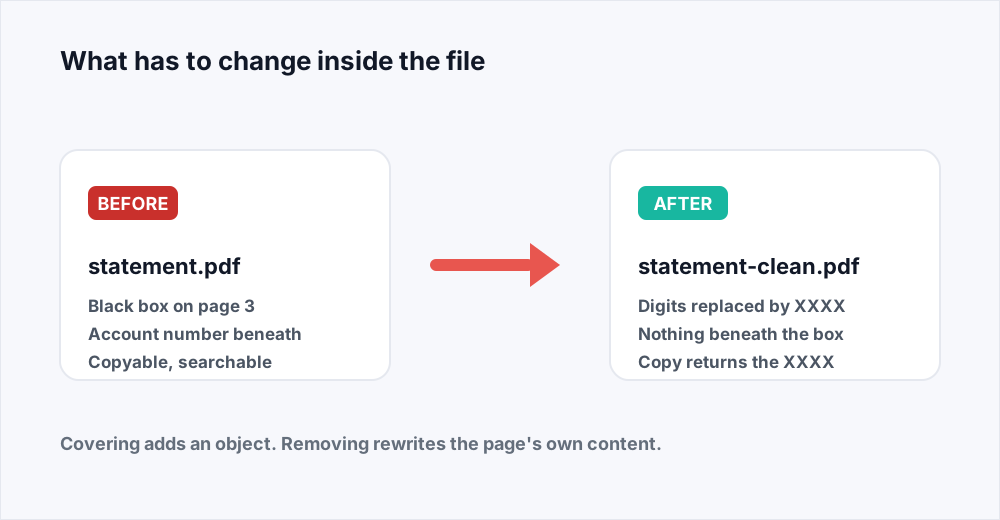
Replace the digits with XXXX XXXX, the salary with a dash, the address with the town. Substituting is usually better than deleting: a reader can see a value was withheld rather than wonder whether a field was left blank.
Langkah 4: Save and check the result
Save a new PDF, open it and select the whole page. The old text should be nowhere in what you copy. If it is, you added text on top instead of changing the text underneath.
When deleting the whole page is the better answer
Sometimes the sensitive material is a whole page: an appendix of personal data, an internal memo bound into a pack, a page of pricing the counterparty should never see. Editing every line on it is slow and easy to get wrong. Organize PDF gives you back one file containing only the pages you list, so the unwanted page is not covered or blanked - it is simply not in the result.
This is the cleanest operation available, because there is no trace to miss: the page's content, images and text are all absent from the file you send. If the choice is between meticulously editing forty lines and dropping a page nobody needs, drop the page.
The same logic applies in reverse when a document is mostly sensitive: keep only the pages the recipient asked for. A short file you built deliberately is easier to be confident about than a long file you tried to clean.
What each approach actually removes
The same page, handled five ways, and what survives afterwards.
| What you do | Text still in the file | Metadata and attachments | Good for |
|---|---|---|---|
| Draw a black rectangle over it | Yes - copyable and searchable | Untouched | Nothing. Do not send this |
| Replace the text with the editor | No - the characters are rewritten | Untouched | A name, a number, a line or two |
| Delete the page with Organize | No - the page is not there | Untouched | A whole page of sensitive material |
| Re-render the page as an image | No - there is no text layer left | Untouched | A last resort, at a real cost |
| A specialist redaction tool | No | Scrubbed as well | Court, medical and regulated work |
How to test your own file before you send it
None of this requires trust. You can check any PDF in half a minute, and you should check every file you have hidden something in, including files somebody else prepared.
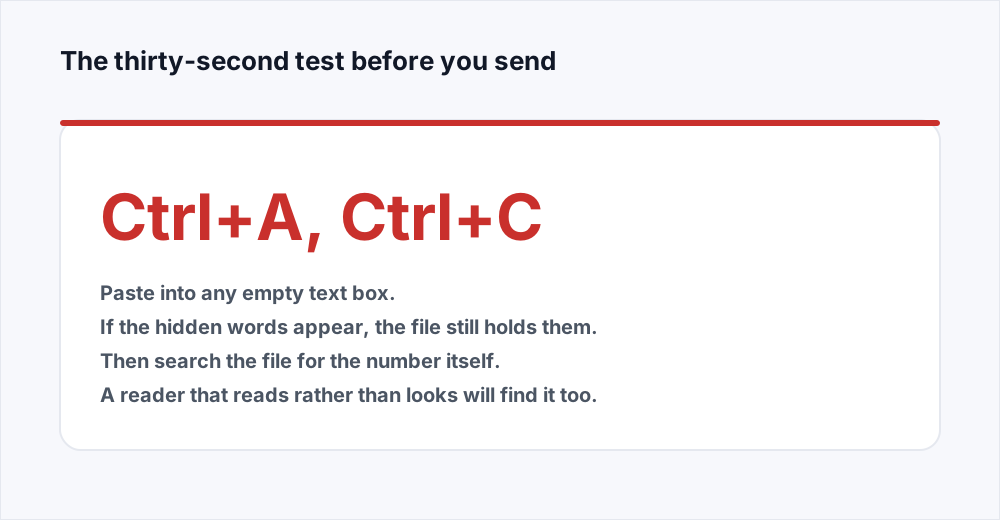
Open the finished document, press Ctrl+A to select the whole page - Cmd+A on a Mac - then Ctrl+C, and paste into any empty text box: an email draft, a notes app, a browser search bar. You now have the page's text layer in front of you, with no rectangles in the way. If the number you hid is in that paste, the file still holds it.
Then use the reader's own search. Type the account number or the surname and see whether the reader jumps to the page and highlights something under a black bar. A match there confirms the blanking is cosmetic.
Finally, open the file in a different reader. A black box added as an annotation rather than as page content can fail to appear at all in a reader that does not draw annotations, or be dragged aside by anyone who can select it. Page content behaves the same everywhere; an annotation is a suggestion.
When flattening or printing to PDF does work
People often say that flattening a PDF, or printing it back to PDF, fixes a covered-up secret. That is half right, and the wrong half gets files sent.
Flattening, in the sense most tools mean it, merges annotations into the page content. A black box added as an annotation becomes part of the page, which is an improvement - it can no longer be dragged aside. But the text underneath is still text, so a copy returns exactly what it did before.
What does work is a full re-render: rasterising each page to an image and building a new PDF from those images. There is then no text layer at all, so there is nothing to copy and nothing beneath the black bar but pixels. Some print-to-PDF paths do exactly this and some do not - the ones that preserve selectable text preserve your secret with it. The copy test above is the only way to know which you used.
The cost is why this is a last resort. The document stops being searchable and readable by a screen reader, and the file usually gets bigger, because a page of text stored as letters is far smaller than the same page stored as a photograph of letters. Nothing here puts a text layer back into the PDF itself; the OCR option in PDF to Word and PDF to Excel, part of Pro, can read the visible words out into a separate Word or Excel file.
If the result is then too heavy to send, Compress PDF will resample those page images and bring the size down. That is the one case where compression helps a lot, because the file is now entirely pictures.
What compliance-grade redaction needs that we do not do
We do not offer a dedicated redaction tool. If your document is going to a court, a regulator or a hospital, this is the checklist a specialist tool works through, and it is why you should use one.
- The page text itself, removed rather than covered. This is the part our editor does, and the part most people think a black box has done.
- Document metadata. Title, author, subject and the producing application are stored apart from the page and routinely carry a real name or an internal file path.
- Embedded attachments. A PDF can carry whole files inside it - a spreadsheet, the original scan, a message - none visible on any page.
- Comments, annotations and form field values. A sticky note or a filled field can hold the exact text you removed from the page.
- Bookmarks, links and the outline. A bookmark named after a person survives every change to the pages.
- Incremental save history. A PDF saved repeatedly can hold earlier versions of itself in the same file, so a previous state of the page is recoverable after the current one is clean.
When you can redact a PDF with a black box
A page that is a scan has no text layer, so a black box over a scanned account number does hide it: there are no characters underneath, only pixels. That is the one case where drawing a rectangle is genuinely enough.
Be careful about the word scan, though. Many documents that look scanned have had text added back by recognition software, and many are a mix. If the copy test returns anything at all, the file has a text layer and the rectangle is decoration.
Working on a file you would rather not upload
There is an awkwardness in taking a document full of personal data to a website in order to remove the personal data, so it is worth knowing which of our tools touch a server. Edit PDF does not: it runs in your browser and nothing is sent to us, which is why it is the tool to reach for here. The guide to editing a PDF covers what it can change.
Organize and the rest run on a server, deleting the input the moment the job finishes and the result once you have it. The security page sets out each stage and how we handle files explains why.
Frequently asked questions
Is drawing a black box the same as redacting a PDF?
No. A black box is a shape drawn on top of the page. The text underneath is still in the file and can be selected, copied and searched. Proper redaction removes the characters from the page content, so there is nothing left to recover.
How do I remove text from a PDF permanently?
Edit the text rather than cover it. Edit PDF changes existing text in its own font, in your browser, so the original characters are replaced in the page itself. For a whole page, delete it with Organize PDF instead.
How can I tell if my PDF redaction failed?
Open the finished file, press Ctrl+A then Ctrl+C, and paste into any empty text box. If the text you hid appears, it is still in the file. Also search the document for the number: a match on a page that looks blanked means the blanking is only visual.
Does flattening a PDF remove hidden text?
Usually not. Flattening normally means merging annotations into the page, which leaves the text layer intact. Only a full re-render of each page to an image removes the text, and that costs you searchable text and a bigger file.
Does a password stop someone reading the hidden text?
No. Protect PDF controls who can open the document; it does not change the content. Anyone who opens it with the password can select and copy whatever is underneath a black box.
Do you have a redaction tool?
Not a dedicated one. We can replace text with Edit PDF and delete pages with Organize PDF, which handles most everyday cases. We do not scrub metadata, attachments, comments, bookmarks or earlier saved versions, so use a specialist tool for court, medical or regulated documents.
In short
A PDF page is a list of drawing instructions, and a black rectangle is one more instruction laid on top. The text you covered is still there, copyable and searchable, and that is how court filings and government reports keep leaking the names they meant to hide. Replace the words with the editor, or delete the page, and test the result by selecting it and pasting it somewhere before you send it.
For anything going to a court, a regulator or a hospital, use a specialist redaction tool: metadata, attachments, comments, bookmarks and revision history need scrubbing too, and we do not do that. Otherwise our tools are free and need no account - see every tool.