Put a password on a PDF and you have done one of two things, and the format does not make it obvious which. You may have encrypted the file, so that its contents are unreadable to anyone without the password - not just hidden, but scrambled, such that the text, the images and the metadata are all noise until the right key is supplied. Or you may have attached a note to an otherwise readable file asking readers not to print or copy it, which any reader can ignore and most tools can strip in a second.
The first is protection. The second is etiquette. A great deal of confusion about PDF passwords comes from tools that offer the second while implying the first.
This guide explains the difference, how Protect PDF applies the first kind using AES-256, how to choose a password that is actually strong, how to get it to the person who needs it, and what a protected file can and cannot do afterwards.
How to password protect a PDF in four steps
The encryption is applied on a server; the password never leaves the request that carries it.
Langkah 1: Open the tool
Go to Protect PDF. No account, nothing to install.
Langkah 2: Add the PDF
Drag it onto the page or choose it. Up to 20 MB on the free plan, or 250 MB on Pro. It must not already be protected - see below.
Langkah 3: Set the password, twice
Type it and confirm it. The confirmation exists because a typo in a password you cannot see locks the file to a password nobody knows. Choose it carefully; the section on strength is short and worth reading.
Langkah 4: Download the protected file
The result is encrypted with AES-256. Open it once to check the password works. Then send it - and the password - by different routes.
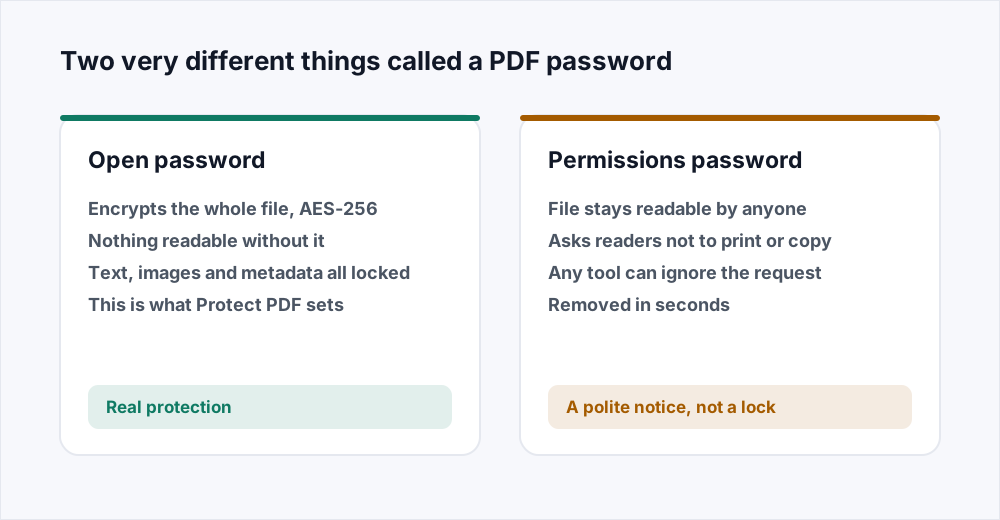
Open passwords and permissions passwords
An open password - the PDF specification calls it the user password - is the key to an encrypted file. Everything inside the file is encrypted with it: every page's text and images, the document's title and author, the attachments. A reader that does not have it cannot show a single word. This is what Protect PDF applies, using AES with a 256-bit key, which is the strongest encryption the format supports and the same standard used to protect classified material.
A permissions password - the owner password - is different in kind. It leaves the file readable by anyone and records a set of flags: no printing, no copying text, no editing. Readers that follow the rules honour the flags. Readers that do not, or tools that simply rewrite the file without them, do not. The flags are a request, and the format cannot make them more than that, because a document that can be displayed can be copied from the display.
So if the question is whether someone can read the file, only an open password answers it. If the question is whether a well-behaved reader will offer a print button, a permissions password answers that, and nothing stronger is available. Protect PDF sets an open password because that is the thing that does what people mean by protecting a file.
Choosing a password that holds
AES-256 cannot be broken by guessing the key; there are more possible keys than there are atoms to try them with. It can be broken by guessing the password, and a short or common password is guessed in seconds by software that tries millions per second. The encryption is only as strong as what you typed.
Length matters more than anything else. A password of four unrelated words - the kind a person can remember - is far stronger than eight characters of mixed symbols, because every extra character multiplies the number of guesses needed. Twelve characters is a reasonable floor for a document that matters; sixteen or more for one that really matters.
Avoid anything that could be guessed by someone who knows you or knows the document: the company name, the project name, the year, the recipient's name. Avoid anything that appears in a list of common passwords, which includes every dictionary word on its own and most words with a number after them. And do not reuse a password that unlocks anything else, because the recipient of this file will have it.
How long a password survives guessing
| Password | Roughly | Verdict |
|---|---|---|
| report2026 | Seconds | In every list. Do not |
| Tr0ub4dor&3 | Hours to days | Hard to remember, not that hard to guess |
| correct horse battery staple | Centuries | Easy to remember, and strong |
| Four random words plus a number | Longer than that | The pattern to use |
Getting the password to the reader
A protected file and its password sent in the same email is a file sent unprotected with an extra step. Anyone who can read the one can read the other. The whole point of encrypting the attachment is that the attachment can travel through a channel you do not trust - email, a shared drive, a portal - while the password travels through one you do.
Send the password by a different route. A text message. A phone call. A separate message on a different service. If you must use the same service, send it in a separate message some time later, which is weaker but not nothing. Never put the password in the filename, the subject line or the body of the message that carries the file.
For a file that will be shared with several people, one password per file is the practical limit of the format - there is no per-reader access. If different people should see different parts, split the document and protect each part with its own password, which is a common reason to split in the first place.
Common jobs
The same operation, applied to the documents that usually need it.
- A contract going to a counterparty. Protect it, email it, and phone or message the password. Confirm they can open it before anyone signs anything.
- Payslips or statements for several people. Split the batch into one file per person first, then protect each with its own password. Each person gets their own file and their own key.
- A board pack with a confidential appendix. Either protect the whole thing, or use Organize PDF to separate the appendix, protect only that, and send the two files together.
- A document being kept rather than sent. Protecting a file you will store on a shared drive means the drive's own access controls are no longer the only thing between the document and everyone with drive access.
- A signed agreement. Sign it with Edit PDF, then protect it. The signature is inside the encrypted content and cannot be lifted out without the password.
What the protected file can and cannot do
It opens in every PDF reader that supports AES-256, which is every reader made in the last fifteen years, including browsers. The reader asks for the password once and then shows the document normally: text is selectable, searchable and printable exactly as before, because once decrypted the pages are the same pages.
It cannot be indexed by a search tool that does not have the password, cannot be previewed by an email client or a file manager, and cannot be processed by any tool - including every other tool on this site - until the password is removed. That is the protection working as intended, and it is worth knowing before a colleague asks why the file will not preview.
It does not protect against the person who has the password. Once opened, the document can be printed, copied, screenshotted and forwarded like any other. Encryption controls who can open the file; it cannot control what they do after.
What a password is not
A password is not redaction. A confidential paragraph in a protected file is still in the file, and anyone with the password reads it. If the paragraph must be gone rather than locked, remove it: Edit PDF takes the words out of the page content when you rewrite them, so they are not merely covered over, and a file with the words removed is safe to share with no password at all.
A password is not a signature. Encryption proves nothing about who made the document or whether it has changed since; it only controls who can open it. A signed or certified PDF is a different mechanism, based on certificates, and it is what a court or a registry usually means by a signed document.
A password is not a watermark, and a watermark is not protection. Stamping a document with a name or a date says where a copy came from if it leaks; it does nothing to stop the leak. The two are complementary, and for a document that is both sensitive and widely distributed, both are reasonable.
What happens to your file and your password
Encryption runs on a server. The upload is streamed to disk without being held whole in memory, encrypted with the password you supplied, and the unencrypted input is deleted the moment the job finishes. The protected result is available for thirty minutes and deleted as soon as you have downloaded it. The password is used to encrypt the file and is not stored anywhere. The security page sets out every stage, and how files are handled goes into the design behind it.
No account, no watermark, no limit on how many files.
Frequently asked questions
What encryption does Protect PDF use?
AES with a 256-bit key, which is the strongest the PDF format supports. The whole file is encrypted - text, images, metadata - and nothing in it can be read without the password.
What is the difference between an open password and a permissions password?
An open password encrypts the file; nobody can read it without the password. A permissions password leaves the file readable and asks readers not to print or copy, which any tool can ignore. Protect PDF sets an open password, because that is what actually protects a document.
Can a PDF password be removed or cracked?
A strong password cannot be cracked in any useful time; AES-256 has no shortcut. A weak password - short, a dictionary word, a name and a year - can be guessed in seconds. The encryption is as strong as the password, so choose a long one.
I forgot the password. Can you recover the file?
No, and neither can anyone else. That is what encryption means. Keep the password somewhere safe and keep an unprotected copy where only you can reach it.
How should I send the password?
By a different route from the file. If the file goes by email, send the password by text message or phone. A password in the same email as the file protects nothing.
Can I merge or compress a protected PDF?
Not while it is protected - no tool can read an encrypted file's pages. Remove the password, do the work, and protect the result again with Protect PDF. Protect last.
Does the password stop people printing or copying?
It stops anyone who does not have it from opening the file at all. Once someone has the password and has opened the document, they can print, copy and forward it like any other. Encryption controls who can open a file, not what they do afterwards.
In short
An open password encrypts the file with AES-256 and is the only kind of PDF password that stops anyone reading it. Choose a long one - four unrelated words beats eight symbols - send it by a different route from the file, apply it as the last step after every other edit, and keep an unprotected copy somewhere safe, because a lost password is a lost document.
Every tool here is free and needs no account - see them all.